
The workspace before the agents
Before the autonomous agents — the boring work.
Everyone wants the advanced AI features: autonomous agents, multi-file refactoring, agentic workflows. But the teams getting the most value from AI coding assistants aren't the ones with the fanciest prompts. They're the ones who did the boring work first.
You wouldn't drop a new engineer into your codebase with no onboarding doc, no architecture overview, no coding conventions, and say "figure it out." Why do we expect an AI to perform well under those exact conditions?
The specific problem
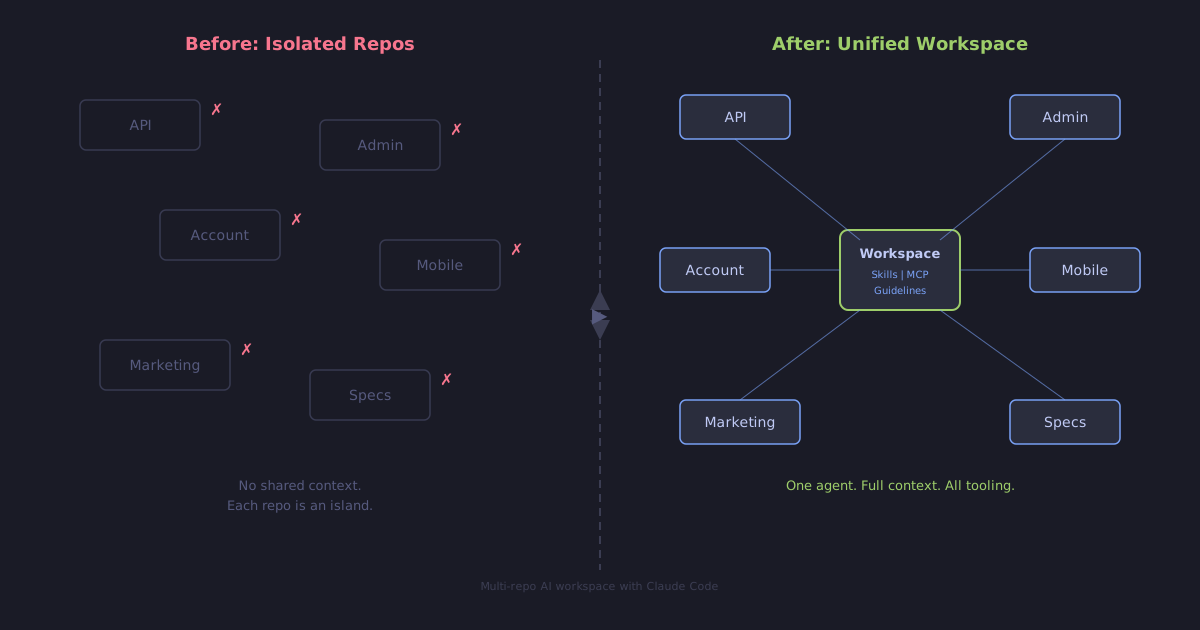
We run a multi-repo platform — API, admin panel, customer portal, mobile app, marketing site, and more. Ten-plus core repositories for one project. When we started using Claude Code, each repo was an island. AI worked great inside one project but had zero awareness of the others. Cross-repo tasks meant constant context-switching and manual hand-holding.
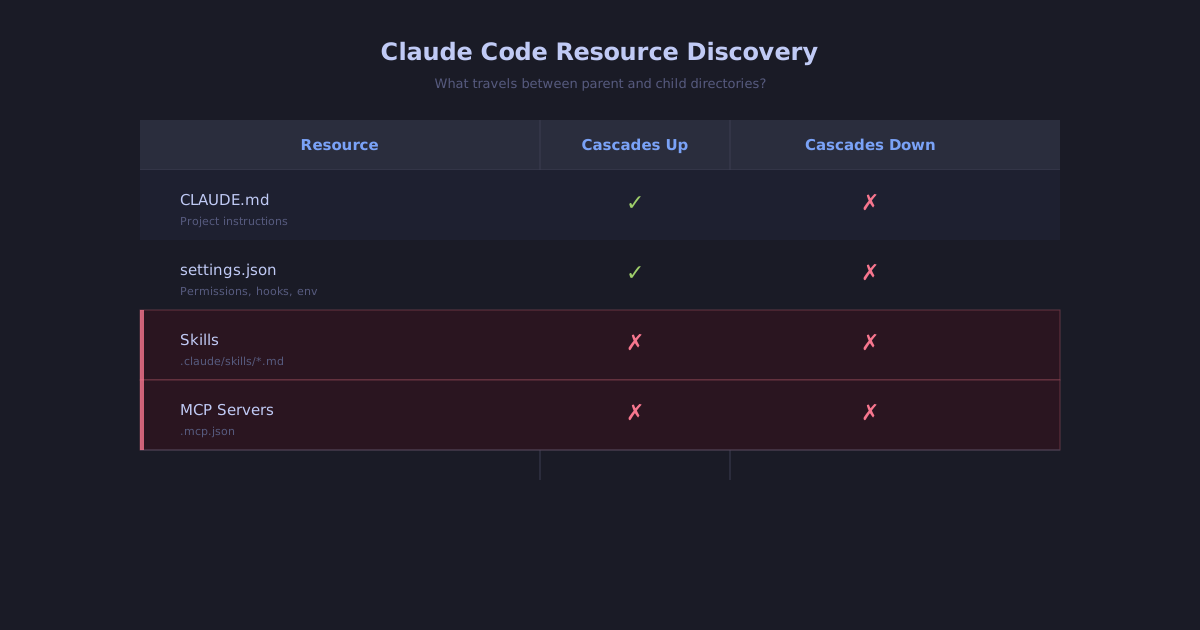
There's a real limitation here: Claude Code discovers skills and MCP servers only from the project root. If you start an agent at the workspace level, it can't see skills or MCP configs defined in child repositories. And spawning subagents doesn't solve it either — subagents don't inherit skills from the parent conversation. Your agent has the knowledge, but not the tooling.
(The docs describe automatic skill discovery across nested directories, but as of Claude Code v2.1.128 (May 2026) it's still not wired up — see issue #40640, open since March and independently reproduced by other devs since publication. In practice, nested skills don't appear in /skills, can't be invoked with /skill-name, and aren't picked up automatically — regardless of which subdirectory you're editing. Community workarounds have surfaced; most are skills-only. The workspace approach below covers skills, MCP, and plugins together.)
The boring work
So we did it. We created a lightweight workspace repository that wraps all our child repos. Sync scripts symlink skills and generate MCP server configurations from each child project to the workspace level — with proper working-directory handling, so cwd-sensitive tools still run against the correct repo. Now an AI agent launched from the workspace root has full context and full tooling across the entire platform.
The configuration itself is simple:
- A
workspace.jsonthat defines all repos, their descriptions, and resource locations. - A
CLAUDE.mdthat tells the AI how to find guidelines for each repo. - Sync scripts that symlink skills and generate MCP configs automatically.
- Each repo maintains its own conventions — the workspace just makes them accessible from one place.
- An org-level plugin marketplace for skills that apply across all repos — domain glossary, git conventions, release process — available without per-repo setup.
Here's the shape of the workspace.json we use:
{
  "name": "platform",
  "repos": {
    "api": {
      "url": "git@github.com:org/api.git",
      "description": "API backend",
      "skills": [".claude/skills", ".ai/skills"],
      "mcp": { "cwd_required": true }
    },
    "admin": {
      "url": "git@github.com:org/admin.git",
      "description": "Admin panel",
      "skills": [".claude/skills"],
      "mcp": { "cwd_required": false }
    },
    "account": {
      "url": "git@github.com:org/account.git",
      "description": "Customer account portal"
    },
    "marketing": {
      "url": "git@github.com:org/marketing.git",
      "description": "Marketing site"
    },
    "mobile": {
      "url": "git@github.com:org/mobile.git",
      "description": "Mobile application"
    },
    "specs": {
      "url": "git@github.com:org/specs.git",
      "description": "Feature specs and implementation plans"
    },
    "content": {
      "url": "git@github.com:org/content.git",
      "description": "Content management system"
    },
    "...": "..."
  }
}
Each repo entry can opt into specific resource locations (skills) and signal whether its tooling needs a cwd-aware wrapper (mcp.cwd_required). The sync scripts read this file and lay everything out at the workspace root.
Symlinks at the workspace level are prefixed with the repo name (api--…, admin--…) so skills from different repos never collide, and an agent can pick the right one explicitly. Not the same thing as the auto-scoped, file-location-aware filtering that's still missing from Claude Code — but explicit and predictable, which has its own merits in a team setting where you want to know exactly which skill ran.
The result
AI agents that understand our architecture before writing a single line of code. No more hallucinated patterns. No more "why did it ignore our conventions" in PR reviews. The same AI, dramatically better output — just because we told it how we work.
If you're running multiple repos and using AI coding tools, start with the workspace. The advanced features will thank you later.